
Google A2UI 1.0: Why AI Agents Will Need Better Business Interfaces
Google’s A2UI 1.0 announcement is a useful signal for Saudi and Gulf businesses: AI agents are moving beyond chat boxes into interactive screens, forms, approvals, and workflows.
Many businesses in Saudi Arabia and the Gulf are exploring AI by adding a chatbot to a website, portal, or internal system. That is a reasonable starting point, but it is not enough for serious business workflows. When an AI assistant needs to update a customer record, prepare an order, request approval, or collect missing documents, plain text chat becomes risky and inefficient. The next step is not only “smarter AI”; it is better interfaces that allow AI agents to work inside controlled, auditable, user-friendly screens.
What Google’s A2UI 1.0 announcement signals
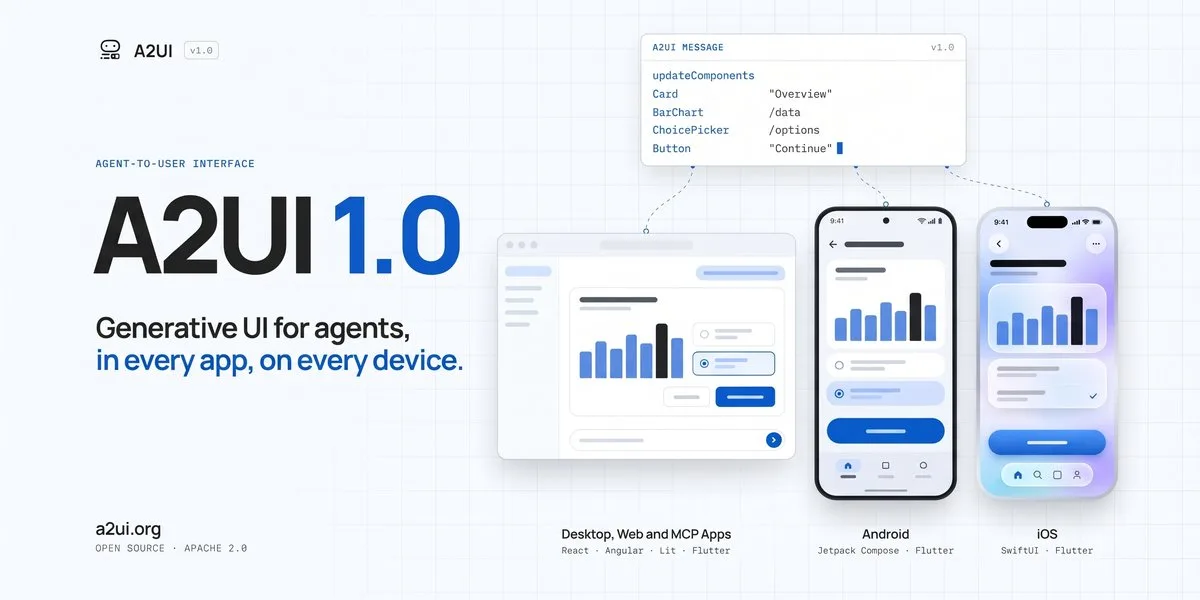
According to the Google Developers Blog, Google announced A2UI 1.0 as an open protocol for generative UI. The source describes it as a way for AI agents to render interactive, native screens across web, mobile, and desktop applications. Google also notes open-source renderer SDKs for technologies including React, Angular, Lit, Flutter, SwiftUI, and Jetpack Compose.
For business leaders, the technical details matter less than the direction of travel. AI agents are no longer expected to live only inside a chat window. They are moving toward interactive experiences where the agent can present a form, show options, ask for confirmation, display a summary, or guide a user through a workflow inside an existing application.
This is important because many real business tasks are not just conversations. They include structured data, permissions, validations, approvals, attachments, exceptions, and records that must be saved correctly. A chat-only experience can be useful for answering questions, but it is often too loose for operational work.
A2UI 1.0 is therefore a practical signal: companies should start thinking about “agent-ready interfaces,” not just “AI chatbots.” Whether or not a business uses Google’s protocol directly, the idea behind it is relevant to any modern web application, customer portal, ERP extension, CRM workflow, or internal approval system.
Why chat alone is not enough for business workflows
A chat interface is flexible, but business processes need structure. Consider common examples in Saudi and MENA organizations: submitting a service request, onboarding a supplier, preparing a quotation, handling a support ticket, scheduling a field visit, or approving an internal purchase. Each of these tasks involves more than a message.
A user may need to enter specific fields. A manager may need to review a clear summary before approval. The system may need to check whether the person has permission to perform an action. The company may need an audit trail showing who approved what, when, and based on which information.
If all of this happens inside a free-text conversation, mistakes become harder to prevent. A user might approve something without seeing all required details. The AI might misunderstand an instruction. A missing field might be discovered too late. A manager might not know whether the action was suggested by AI, confirmed by a human, or completed automatically.
Interactive screens reduce these risks. Instead of asking the user to type everything, the agent can present a structured form. Instead of relying on a vague “yes,” the system can show a confirmation screen with the exact action, impact, and responsible user. Instead of hiding complexity inside a chat thread, the interface can make the process visible and controlled.
This is especially relevant for businesses that already operate through portals and internal systems. The future is unlikely to be one chatbot replacing every application. More likely, AI will become part of the application experience: helping users complete tasks, fill forms, retrieve information, compare options, and move work forward with proper controls.
What an agent-ready interface should include
An agent-ready interface is not simply a normal screen with an AI label added to it. It is designed so that humans, systems, and AI agents can work together safely. For non-technical leaders, the key question is: “If an AI assistant helps with this workflow, how do we keep the process clear, controlled, and accountable?”
First, permissions must be explicit. The AI agent should not be able to perform every action for every user. If an employee cannot approve a discount manually, the AI should not approve it on their behalf. Role-based access, approval levels, and restricted actions remain essential.
Second, confirmations should be clear. Before an important action is completed, the system should show what will happen in plain language. For example: which customer record will be updated, what amount will be submitted, which document will be sent, or which request will be closed. The user should confirm the action intentionally.
Third, forms should remain structured. AI can help pre-fill fields, suggest values, or extract information from documents, but the final interface should still show the user what is being submitted. Required fields, validation rules, dropdowns, dates, file uploads, and error messages are still part of a reliable system.
Fourth, audit trails should be built in. Businesses need to know what the AI suggested, what the user approved, and what the system executed. This is not only useful for compliance; it is also important for customer service, internal reviews, and process improvement.
Fifth, fallback paths are necessary. AI will not handle every case perfectly. The interface should allow users to edit, reject, escalate, or switch to a manual process. In sensitive workflows, the best AI experience may be one that knows when to stop and ask for human review.
These design principles are not only for large enterprises. A growing SME with a customer portal, sales workflow, HR system, or operations dashboard can benefit from the same thinking. The goal is not to make the interface complicated. The goal is to make AI assistance practical and safe.
How Saudi and Gulf businesses can prepare now
Businesses do not need to rebuild every system immediately. A better approach is to identify workflows where AI support can reduce friction without removing necessary control. Start with processes that are repetitive, information-heavy, and dependent on clear decisions.
Good candidates include support ticket triage, proposal preparation, document collection, internal approvals, customer onboarding, appointment scheduling, knowledge-base search, and report preparation. In each case, map the current workflow before adding AI. Who starts the process? What information is required? Who approves? What system is updated? What can go wrong? What must be recorded?
Then decide where an AI agent should assist. It may summarize information, recommend the next step, fill a draft form, retrieve relevant records, or prepare a response. But the interface should still define the boundaries. The user should know when they are viewing an AI suggestion, when they are editing it, and when they are approving an action.
For companies planning new web applications or portals, this is the right time to design with agent-readiness in mind. That means clean data structures, modular workflows, API access where appropriate, strong authentication, clear user roles, and screens that can support both manual and AI-assisted actions.
For companies with existing systems, the first step may be a workflow review. Some systems are not ready for AI because the underlying process is unclear. If approvals happen through informal messages, if customer data is duplicated in several places, or if permissions are not well defined, adding AI may increase confusion rather than solve it.
This is where business and technology teams need to work together. AI should not be treated as a separate widget placed on top of operations. It should be designed around the actual way work gets done, with the right balance between automation, human review, and system control.
The practical takeaway: design the workflow, not only the chatbot
Google’s A2UI 1.0 announcement, as covered by the Google Developers Blog, points to a broader shift in AI product design. The interface of the future may not be a single chat box. It may be a combination of conversation, forms, cards, confirmations, dashboards, and guided actions generated or supported by AI agents.
For business owners and managers, this changes the planning conversation. Instead of asking, “Can we add AI chat to our website?” a better question is, “Which business workflows should become AI-assisted, and what interface will make them safe and easy to use?”
That question leads to better decisions. It keeps attention on customer experience, staff productivity, compliance, and operational reliability. It also prevents a common mistake: launching an AI feature that looks modern but does not fit the real process.
The businesses that benefit most from AI will likely be those that prepare their systems for controlled action, not just conversation. They will design screens where AI can help, humans can decide, and the system can record what happened.
Key takeaways
- Google’s A2UI 1.0 is a signal that AI agents are moving from text-only chat toward interactive application screens.
- Business workflows need structure: permissions, forms, confirmations, validations, and audit trails.
- A chatbot alone is often not enough for approvals, customer operations, finance-related tasks, or internal processes.
- Saudi and Gulf businesses should identify workflows where AI can assist while keeping humans in control.
- New portals and custom systems should be designed to support agent-ready interfaces from the beginning.
If you are reviewing how AI could fit into your web app, customer portal, or internal workflow, Pioneers.dev offers a free WhatsApp consultation to help you think through the safest and most practical starting point.
Source: Googleblog.com
Written with AI assistance and reviewed for relevance to Pioneers.dev services.